
Showing posts with label Apps. Show all posts
Dropbox is testing a collaborative note-taking service, codename “Project Composer”
If you have been following Dropbox during the past year or so, you already know that the cloud file sharing service has been growing exponentially in both popularity and features. The San Francisco company has been putting a lot of effort to escape from its simple roots and grow into a sprawling ecosystem, based around collaboration and creative work
.jpg)

This has led to the acquisition of a lot of other services and startups by the cloud system, as well as the introduction of clever new features, options and the vital integration with other major platforms and suites, like Microsoft Office, for example.
As some of you might remember, HackPad was among the businesses that Dropbox took under its wind about a year ago. It was essentially a crowd-funded collaborative note-taking online tool that grew in popularity mostly because of it simplistic and straightforward deign. Now Dropbox is apparently planning to bring it back with a new name and, naturally, with a few new tricks up its sleeve, starting with full integration with the existing cloud ecosystem.
The endeavor, codenamed “Project Composer” is still in testing, but was discovered by a Product Hunt user, as it is being hosted on the Dropbox domain at compose.dropbox.com. Access to it is still restricted, but a screenshot of the service has already leaked on to Twitter. Besides text, it already offers users the ability to add files and tables and more goodies are sure to come.
Judging from the picture, Composer has retained the HackPad spirit, which could definitely translate into a bright future. Of course, the new service will have to compete with industry leaders, such as Evernote, but it does have the advantage of not being overly cluttered with features, plus, let’s not forget, full integration with Dropbox, which a lot of people are already using as a primary cloud storage service.
content courtesy:blog.gsmarena.com
Skype 5.9 for iPhone brings smart dialing, introduces pre-release program
Skype has made a new iOS version available today in the iTunes App Store, which comes with a couple of improvements to the calling features. Skype 5.9 for iPhone also debuts the pre-release program for iOS, through which you can provide feedback and get access to early versions of the app.
.jpg)
It’s sort of like a beta testing thing, and there’s a limited number of preview spots available. You’ll get to give feedback on the newest in-development features, as well as send bug reports to the Skype team.
If that sounds like fun to you, then you need to go here for the full details and a link for registering with the program. Keep in mind that you must be 18 or over, have a valid email address, and a Skype or Microsoft account.
Going back to Skype 5.9 for iPhone, it introduces smart dialing. This means that when you start typing a phone number on the dialpad, Skype will immediately suggest contacts with matching phone numbers, thus making it faster to connect to the people you want to.
The new chat picker has been updated too, with the purpose of making conversations easier to start. When you’ve chosen who you want to talk to, you can tap the phone or video icon at the top to instantly make your call. The chat picker is accessed by tapping on the message icon on the bottom navigation bar when you’re in the recents, favorites, or people view.
content courtesy:blog.gsmarena.com
Google launches Inbox by Gmail, a brand new take on email
Google has just unveiled a new service. It’s called Inbox, and it uses the data in your Gmail account. But it presents this to you in some pretty interesting new ways.
.jpg)

It’s designed to “focus on what really matters”, the company says. It does this by surfacing important information from emails, and by letting you add reminders to your new inbox.
Inbox comes with Bundles, which are an evolution of the categories that Gmail itself got last year. Similar types of email will be bundled together in one row, and if the system doesn’t work well on its own you can train it by choosing which emails it should group. So basically, gone are the category tabs, and in are the new rows of bundles.
Another new feature of Inbox is Highlights. This brings to your attention the most important information in certain messages you receive, such as flight itineraries, event details, as well as photos or documents sent to you by friends and family members. The service will also show you relevant tidbits that weren’t in the original email, such as real-time flight status and package tracking.
This email app is also a to-do app, since you can add reminders to it. Google even boasts that “your inbox becomes a centralized place” in which to see things you need to do alongside emails. Furthermore, the reminders are enhanced by what Google is calling Assists – which are bits of additional information that may help you get things done. Examples include automatically adding the phone number for a store you’re reminding yourself to call. In this situation, you’ll also know whether the store is currently open. And Assists work for email too. If you book a flight, you’ll get a Check In link, and if you book a table at a restaurant, you’ll be shown a map next to your confirmation email.
Finally, Inbox introduces the concept of snoozing both emails and reminders. After you’ve done so, they’ll disappear, but you can set them to come back at another time, or when you arrive at a specific location – such as your home or your office.
Inbox is invite-only for now, so to use it you’ll have to either wait for someone to invite you or send an email to inbox@google.com begging for an invite. Inbox works on the Web, and there are dedicated apps for Android and iOS too. The Gmail apps will still exist, there doesn’t seem to be a plan for Inbox to replace them (at least not yet).
content courtesy:blog.gsmarena.com
Assassins Creed Identity goes official for mobile devices
Ubisoft took the wraps off Assassin’s Creed Identity for iOS and Android. The latest installment of the popular gaming franchise is currently soft launched on iOS in Australia and New Zealand – worldwide availability is pegged for next year.
.jpg)
Assassin’s Creed Identity offers proper RPG gameplay in Renaissance. The game’s Unity engine graphics are stunning for a mobile title.
Gameplay is impressive too – it offers open world experience and many of the tricks that are available on the franchise’s console titles. See for yourself in the video below.
Assassin’s Creed Identity is a free download. Users will be able to spend real money on character customizations and quicker upgrades.
What do you think about the new game? Drop us a line with your thoughts in the comments section below.
content courtesy:blog.gsmarena.com
Redesigned Apple iTunes Store is now rolling out
Google Play Store is not the only content marketplace to get a refresh these days. Apple began rolling out redesigned iTunes Store app to users as well.
.jpg)

The new iTunes Store features design cues from OS X Yosemite and Apple iOS. Like the recently redesigned Apple TV, the iTunes Store user interface got treated to a flattened appearance.
Pages of individual content items have been revamped as well. The shadows and textures of old have made way to a more minimalistic solution that focuses on the multimedia on display.
The iTunes Store redesign should hardly catch anyone by surprise. Apple is all but certain to launch OS X Yosemite to users this coming Thursday, on October 16.
content courtesy:blog.gsmarena.com
Windows Phone 8.1 GDR2 will bring alphabetical order to settings menu
Windows Phone 8.1 has already received its first general distribution release (GDR1) but now rumors are pointing to the second one. According to sources claiming they’ve played with a functional WP device running the GDR2 software the settings menu can finally be sorted alphabetically.
.jpg)
Currently the WP settings menu is a list of settings prioritized the way Redmond saw best and is very confusing to many users. The source claims that the Action center will carry a mobile data toggle and that Cortana (while still in Alpha phase) will become available to more MARKETS .
.
.
We’ve heard that GDR2 will bring support for Qualcomm’s Snapdragon 805 chipset and 2K display resolution support but no such things have been disclosed by the source.
Rumors suggest that the GDR2 developer preview will arrive in October but it could make it sooner than that.
content courtesy:blog.gsmarena.com
Google Play Store updated to v5.0, gets more Material Design elements

Google has started rolling out v5.0.31 of the Play Store for Android. The major difference here is in the UI, and it’s approximately 600% more Material Design now.

First up, the action bar on top is now teal (or something close to that) with a new side menu and a cool animation for the hamburger button. The side menu shows the same items now, but the font is smaller.
In app lists you’ll find that the color of the action bar now applies to the categories below as well. As for the app pages, the ‘What’s New’ section is now at the top with highlight and stays at the top instead of going all the way down when you tap the ‘Read More’ button for description.
Other than that I’d say it more or less looks similar with minor design changes here and there. The update has started rolling out but as usual could take days or weeks before it reaches you, so might as well just head over to the source link below and download the APK now.
‘The Amazing Spider-Man 2′ for iOS and Android game review
Another superhero movie, another superhero movie tie-in game. We see these kind of games pop up quite frequently and rarely do they ever do justice to the movie, let alone to gaming. But people keep making them because, well, who doesn’t like money?


The previous The Amazing Spider-Man game for mobile was mediocre at best (to be honest, the movie wasn’t significantly better). This year, we have a sequel for the movie that promises to be bigger and better than the last one and like clockwork, there is a game that goes along with it. The Amazing Spider-Man 2 game is now out on iOS and Android and we decided to take a look at it, expectations set firmly to ‘Low’.
Gameplay
The Amazing Spider-Man 2 sees the return of our friendly neighborhood Spider-Man, solving crimes and taking out bad guys before bed time. The story of the game is of course based on that of the movie, with a few extra things thrown in for good measure.
The basic gameplay should be familiar to anyone who’s played the Batman Arkham series on PC or consoles. You enter a mission, which is usually saving someone or solving some crime, and then go to the locations marked on the map. There, you will usually face off against bad guys. The combat is similar to the Batman games, where you just mash one button to relentlessly hit the enemies. There is a button that you push whenever an enemy around you is about to attack (indicated by red markings above him) and you dish out a quick response. There is not a lot here to do other than keep hitting the attack button, which keeps the combat fairly simple and straightforward. Occasionally you will come across some boss fights, which are a combination of hitting the attack button mixed with some quick-time events. Again, fairly simple and straightforward affair.
Other than going around punching people, there is also a lot of web slinging to do in this game. This has always been the most fun part of Spider-Man games and that’s the case here as well. It doesn’t really make a lot of sense because you can just release a web mid-air and it will just stick to some invisible object in the sky and let you move around, but it is a lot of fun. Also, since it is Spider-Man we are talking about here, you don’t have to worry about falling because even if you do he lands safely on his feet like a cat.
Being Spider-Man also means you can stick to practically any surface. You can literally run up and down vertical surfaces like it’s no big deal or just stick to a wall with your back and admire the view.
To enhance his abilities, the game offers you these serums that you can use but unfortunately, they all cost in game currency and when you are out of those you have to pay real money. There are also extra suits here to unlock, which cost a LOT of money, more than the game itself, for that matter. As is usual for Gameloft games, there are a lot of IAPs here and they are priced far too high for anyone to take them seriously.
One absurd drawback with the game is that it does not work offline, so you need a constant internet connection to play. If you’re on a device without 3G, such as the iPad or the iPod touch, and out of Wi-Fi range, you can’t even start the game.
Graphics and Sound
The Amazing Spider-Man 2 features some sharp new graphics that are a significant improvement over the previous game. Things such as Spider-Man’s suit and the details in the buildings look great. The city itself is also quite big and there are plenty of places to explore. Only thing letting the visuals down are the spotty textures and some low resolution assets in places and an inconsistent framerate, even on something as powerful as the iPad Air. Other than that, the visuals are pretty good.
Sound-wise, you have to deal with the game’s less than spectacular voice acting and dialogue. The dialogs are all cheesy and Spider-Man’s wisecracks get tiring very quickly. The voice acting isn’t particularly great, either. Overall, nothing too impressive on the sound front.
Verdict
The Amazing Spider-Man 2 is a decent game in and of itself, even if you ignore the movie tie-in. There is a good amount of fun to be had here, particularly when you are swinging around the city, which is by far the most entertaining mode of transportation in any game. The rest of the gameplay is adequate, if not equally exciting. The visuals are good but the voice acting and dialogs aren’t. Overall, a decent game for the price but would be a better deal after it goes on sale.
Rating: 6.5/10
Pros: Web slinging is fun, simple and intuitive combat, attractive visuals
Cons: Framerate issues with occasional spotty textures, overpriced in-app purchases, tacky dialogs and voice acting, does not work without internet connection
Pros: Web slinging is fun, simple and intuitive combat, attractive visuals
Cons: Framerate issues with occasional spotty textures, overpriced in-app purchases, tacky dialogs and voice acting, does not work without internet connection
WhatsApp for Android update adds new group mute settings
WhatsApp has released an update for Android (v2.11.230) that brings with it the highly requested group muting settings.

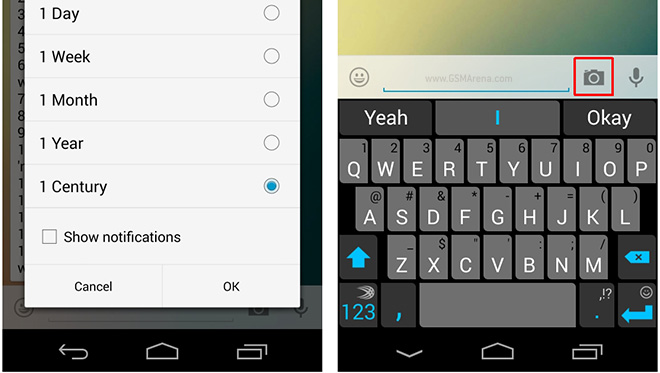
Anyone who has used WhatsApp groups would know how annoying some of them can get over time and there was no way to permanently mute them. The latest update, however, adds some new options that lets you mute a group beyond one week, all the way up to a century.
More importantly, WhatsApp has also added the ability to hide notifications as before, even if you muted a group, the phone would still show silent notifications. Now, if you uncheck ‘Show notifications’, the group would be totally silent.
Another change in the update is a camera icon next to the text input field in chats that lets you quickly take a photo and send to your contact, similar to Snapchat.
The update has not been pushed to the Play Store, yet, and you will have to go to the WhatsApp website (link below) to manually download and install the update.
Download •
Microsoft is in trouble for the new OneDrive name
Microsoft seems to have really bad luck with its SkyDrive cloud service.
First a UK court ruled out Microsoft is infringing British Sky
Broadcasting Group trademark last summer and Microsoft has agreed to
change the name.
 Just two days ago Microsoft announced
the new name of the service – SkyDrive was re-branded to OneDrive. And
as of today Microsoft is in trouble once again for the same reason.
Just two days ago Microsoft announced
the new name of the service – SkyDrive was re-branded to OneDrive. And
as of today Microsoft is in trouble once again for the same reason.
As it turns out One.com offers a similar cloud service called Once Cloud Drive and Microsoft is allegedly infringing the One.com trademark. It does sound close, doesn’t it? Naturally, One.com says this will lead to a confusion and the company is now “consulting trademark experts”.
If you “bing” ‘one drive cloud’ the service pops up as the third result – using Google moves it on top of the results. There, I’ve just done the marketing research Microsoft should have done in the first place. Hopefully this awkward situation will be resolved soon.
As it turns out One.com offers a similar cloud service called Once Cloud Drive and Microsoft is allegedly infringing the One.com trademark. It does sound close, doesn’t it? Naturally, One.com says this will lead to a confusion and the company is now “consulting trademark experts”.
If you “bing” ‘one drive cloud’ the service pops up as the third result – using Google moves it on top of the results. There, I’ve just done the marketing research Microsoft should have done in the first place. Hopefully this awkward situation will be resolved soon.
Evernote beta for Android gains handwriting support
The Evernote’s beta app for Android has gained handwriting support and
now lets you scribble down notes or just doodle around, saving
everything as is – not transforming your handwriting into neat text like
on the Galaxy Note 3 for example.
 The update will take its time getting to the official Android app but for now you can test the beta through the Google+ group.
The link is down below but you’d need to be patient and wait for the
administrators to allow you permission to be in the group as it is
private.
The update will take its time getting to the official Android app but for now you can test the beta through the Google+ group.
The link is down below but you’d need to be patient and wait for the
administrators to allow you permission to be in the group as it is
private.
The Evernote guys are also working on adding highlights, table support, horizontal ruler and encrypted text support for the app editor, but there’s no saying when those might make it.
The Evernote guys are also working on adding highlights, table support, horizontal ruler and encrypted text support for the app editor, but there’s no saying when those might make it.
Angry Birds Star Wars 2 adds 8 new characters
Love Angry Birds Star Wars? Well you’ll be happy to hear that Rovio has
added 8 new characters to their latest iteration of the popular
bird-flinging franchise.
 The new guests come part of the Carbonite pack.
Angry Birds Star Wars 2 throws the lovable birds into the Star Wars universe yet again. You can check out the epic trailer below:
The 8 new characters also come with their own special powers. Rovio
has also teased that players will have a chance to win new Telepods, but
we’ll have to “stay tuned” to see how we can go about doing that.
Anyone here excited for the new Carbonite Pack?
Angry Birds Star Wars 2 throws the lovable birds into the Star Wars universe yet again. You can check out the epic trailer below:
Anyone here excited for the new Carbonite Pack?
Foursquare to power upcoming WP 8.1 Cortana voice assistant
Microsoft’s recent investment of $15 million into popular location-based
app Foursquare means that it will use the app’s data in its anticipated
Cortana voice assistant as part of the upcoming Windows Phone 8.1 release

The Windows Phone 8.1 update, with which Microsoft aims to get all of its major OSs to the same build number, is set to feature Cortana of the Halo universe as its voice assistant.
The Foursquare partnership will allow Microsoft to use the company’s data for dining and entertainment suggestions based on user location, as well as location-based tips, suggestions and discounts. Microsoft hope to develop Cortana into a capable voice assistant that will rival Apple’s Siri and Android’s Google Now in regards to functionality.
Foursquare’s data will also be used in other areas of the Windows Phone 8.1 system, specifically the Bing-powered search feature. Sources indicate that the update will appear within the next few months.
The Windows Phone 8.1 update, with which Microsoft aims to get all of its major OSs to the same build number, is set to feature Cortana of the Halo universe as its voice assistant.
The Foursquare partnership will allow Microsoft to use the company’s data for dining and entertainment suggestions based on user location, as well as location-based tips, suggestions and discounts. Microsoft hope to develop Cortana into a capable voice assistant that will rival Apple’s Siri and Android’s Google Now in regards to functionality.
Foursquare’s data will also be used in other areas of the Windows Phone 8.1 system, specifically the Bing-powered search feature. Sources indicate that the update will appear within the next few months.
Grand Theft Auto 5 claims the honors for best-selling game of 2013
Grand Theft Auto 5 is last year’s best-selling video game. Take-Two
Interactive Software Inc., the company who owns the wildly popular
gaming franchise announced the achievement during its 2014 fiscal Q3
earnings report.
 The news should hardly catch anyone by surprise, as the game racked up more than $1 billion in sales in its first three days of official availability. GTA 5 took the best-selling video game crown with more than 32.5 million units sold.
As expected, the strong sales of the game contributed to strong financial results for its publisher. During the fiscal Q3, Take-Two Interactive Software Inc. reported net revenue of $1.86 billion – a massive increase over the $415.8 million for the same period the previous year. Additionally, the publisher increased its financial outlook for the fiscal 2014.
As expected, the strong sales of the game contributed to strong financial results for its publisher. During the fiscal Q3, Take-Two Interactive Software Inc. reported net revenue of $1.86 billion – a massive increase over the $415.8 million for the same period the previous year. Additionally, the publisher increased its financial outlook for the fiscal 2014.
Marvel’s Captain America: The Winter Soldier coming to iOS, Android and Windows Phone
Gameloft in association with Marvel is developing the gaming version of
the upcoming superhero movie Captain America: The Winter Solider.
 Gameloft will be bearing all the production expenses and the popular
gaming firm will be releasing the official game in March for the iOS and
Android platforms. The video trailer also
says that the game will be hitting the Windows Store, but there is no
official word on when that might happen.
Gameloft will be bearing all the production expenses and the popular
gaming firm will be releasing the official game in March for the iOS and
Android platforms. The video trailer also
says that the game will be hitting the Windows Store, but there is no
official word on when that might happen.
Captain America: The Winter Soldier game will be a combination of combat action and flexible tactical game. The gameplay is all about Captain America who is leading a team of SHIELD agents in a comic world.
You will be playing the part of the superhero, who fights to save the world from the Marvel villains. With the multiplayer mode you can team up with your friends and compete in different leagues.
Captain America: The Winter Soldier game will be a combination of combat action and flexible tactical game. The gameplay is all about Captain America who is leading a team of SHIELD agents in a comic world.
You will be playing the part of the superhero, who fights to save the world from the Marvel villains. With the multiplayer mode you can team up with your friends and compete in different leagues.
Windows 8.1 Update 1 said to be arriving on March 11
Microsoft will be releasing an update to the current Windows 8.1 OS,
tentatively called Windows 8.1 Update 1, on March 11, according to ZDNet.
The update will brings several under the hood changes, as well as a
bunch of user facing ones that will help bridge the gap between the
desktop and ‘Metro’ modes.
 One of the new changes said to be present in Update 1 is the ability
to pin Metro-style apps to the taskbar in the desktop mode. This will
allow you to launch those app quickly just as you would a standard
desktop app. You can also hover over the icons of minimized apps to see a
thumbnail preview. Lastly, Metro-style apps are also said to get a
close button that will make it easier and more obvious on how to quit an
app.
One of the new changes said to be present in Update 1 is the ability
to pin Metro-style apps to the taskbar in the desktop mode. This will
allow you to launch those app quickly just as you would a standard
desktop app. You can also hover over the icons of minimized apps to see a
thumbnail preview. Lastly, Metro-style apps are also said to get a
close button that will make it easier and more obvious on how to quit an
app.
As far as under the hood changes are concerned, Update 1 will feature reduced memory and disk space requirements, which will enable it to work better on cheap small tablets.
The update should be free and will be provided through Windows Update.
As far as under the hood changes are concerned, Update 1 will feature reduced memory and disk space requirements, which will enable it to work better on cheap small tablets.
The update should be free and will be provided through Windows Update.
Google acquires Nest Labs for $3.2 billion in cash
Google acquired the designer and manufacturer of home products Nest
Labs. The search engine giant paid $3.2 billion in cash for the Palo
Alto-based company.
 Founded in 2010, Nest brings modern design and functionality to ubiquitous home products. The
company has a learning thermostat and a carbon monoxide & smoke
detector currently on sale. Both gadgets connect with Android and iOS
devices to enhance their usual functionality.
Founded in 2010, Nest brings modern design and functionality to ubiquitous home products. The
company has a learning thermostat and a carbon monoxide & smoke
detector currently on sale. Both gadgets connect with Android and iOS
devices to enhance their usual functionality.
Nest will continue to operate with its own brand, under the leadership of its founder and current CEO Tony Fadell. Google is yet to announce its plans for Nest Labs, though some sort of home implementation seems more than likely.
The acquisition is expected to close in the next few months after the usual round of regulatory approvals.
Nest will continue to operate with its own brand, under the leadership of its founder and current CEO Tony Fadell. Google is yet to announce its plans for Nest Labs, though some sort of home implementation seems more than likely.
The acquisition is expected to close in the next few months after the usual round of regulatory approvals.
Samsung will show Tizen at MWC, despite it not being ready
There’s a reason why there hasn’t been much reported on Samsung’s home-grown Tizen OS; it’s because there isn’t much to show.
 The hopeful mobile operating system isn’t receiving much love from
both carriers and developers, and it’s causing major delays for Samsung.
The hopeful mobile operating system isn’t receiving much love from
both carriers and developers, and it’s causing major delays for Samsung.
NTT Docomo pushed back the debut of its inaugural Tizen handset due to a “lack of demand”. Telefonica and Sprint initially backed the Tizen horse, but have since pulled out, most likely due to the same reason.
Samsung plans to release Tizen as soon as possible and promises that they will give a “sneak preview” of Tizen phones at MWC (Feb. 24-27). However, it may be too little too late. The Korean manufacturer is doing big business with their Android handsets, and introducing a new OS into the mix could be seen as superfluous to consumers.
Are you excited about Tizen at all? Or do you think that Samsung’s own OS is doomed to fail?
NTT Docomo pushed back the debut of its inaugural Tizen handset due to a “lack of demand”. Telefonica and Sprint initially backed the Tizen horse, but have since pulled out, most likely due to the same reason.
Samsung plans to release Tizen as soon as possible and promises that they will give a “sneak preview” of Tizen phones at MWC (Feb. 24-27). However, it may be too little too late. The Korean manufacturer is doing big business with their Android handsets, and introducing a new OS into the mix could be seen as superfluous to consumers.
Are you excited about Tizen at all? Or do you think that Samsung’s own OS is doomed to fail?
Google Maps 7.6 update brings a bunch of new features
Maps 7.6 has just been made available for download, and we have a breakdown of all the new features and functionality it brings.
 New updates in Google Maps 7.6 are Offers, Preferred Transit Modes,
interface and icon changes, and new domains. For a more in-depth look at
these features, join us after the jump.
New updates in Google Maps 7.6 are Offers, Preferred Transit Modes,
interface and icon changes, and new domains. For a more in-depth look at
these features, join us after the jump.
What’s Offers? If you’re not familiar, it’s Google’s way of integrating local business’ deals and incentives for bringing customers into their stores. There are also loyalty incentives for bringing repeat business to the locations. In the update, the “Your Offers” interface has been improved to allow for filtering out active offers in the area from offers you’ve already used or that have expired.
Google Maps has offered different travel routes for some time now, but you’ve had to select a single mode of travel when creating an itinerary. Now with Preferred Transit Modes, you can select multiple modes of transportation for travel itineraries. Want to compare travel times for driving versus the train during rush hour? You can now do this simultaneously with the 7.6 update and not be forced to pick and choose. On mobile devices we can now select the “Avoid Ferries” option while driving. This has been available in the web version of Google maps for quite some time, but we can now use it on the Android app.
A significant number of new domains have also been added under the hood of the application as well. The new domains will help when you click on a maps link while browsing the web: instead of opening up the maps link within your phone’s web browser, it will open up on the maps application instead (or is more likely too with the increase of domains).
Also, the entire interface of Google Maps has been revamped in 7.6 to gel better with the Kit Kat look.
Have you installed the latest version of Google Maps? How do you feel about it? Sound off in the comments!
What’s Offers? If you’re not familiar, it’s Google’s way of integrating local business’ deals and incentives for bringing customers into their stores. There are also loyalty incentives for bringing repeat business to the locations. In the update, the “Your Offers” interface has been improved to allow for filtering out active offers in the area from offers you’ve already used or that have expired.
Google Maps has offered different travel routes for some time now, but you’ve had to select a single mode of travel when creating an itinerary. Now with Preferred Transit Modes, you can select multiple modes of transportation for travel itineraries. Want to compare travel times for driving versus the train during rush hour? You can now do this simultaneously with the 7.6 update and not be forced to pick and choose. On mobile devices we can now select the “Avoid Ferries” option while driving. This has been available in the web version of Google maps for quite some time, but we can now use it on the Android app.
A significant number of new domains have also been added under the hood of the application as well. The new domains will help when you click on a maps link while browsing the web: instead of opening up the maps link within your phone’s web browser, it will open up on the maps application instead (or is more likely too with the increase of domains).
Also, the entire interface of Google Maps has been revamped in 7.6 to gel better with the Kit Kat look.
Have you installed the latest version of Google Maps? How do you feel about it? Sound off in the comments!
Facebook acquires Branch in a $15 million deal

CEO of Branch, Josh Miller, has announced that the service has been bought out by Facebook. As part of the deal, Facebook will also acquire Potluck, a similar service. If you’re not familiar with Branch or Potluck, they’re link-sharing services that allow friends to share news stories and internet articles, and have conversations about said stories. This news-centric app’s intention was to move discussions away from Facebook and email and allow users an easier, more “feed-like” way to talk about the links they’re sharing.

The news doesn’t really come as much of a surprise, considering that Facebook has been moving more towards putting real news stories in your feeds along with photo albums of your best friend’s weird night in Bangkok photo album. Facebook is bringing on CEO Josh Miller to do just this, so he’ll be working for Zuckerberg in addition to being bought out.
Branch’s inception came at the hands of a $2 million investment from Jason Goldman, Evan Williams and Biz Stone (the men behind Twitter), SV Angel, Lerer Ventures, and John Borthwick of Betaworks.
It’s interesting to note that Miller was also a little critical of Facebook, even going so far as to state that the social media giant “…may have an irreversibly bad brand.” In the same post, he gave suggestions as to how Facebook could improve upon its News Feed. It may have been a way for Miller to get the attention of FB, and if it was intentional, it was a heck of a smart move.


.jpg)